The first thing I asked the founders in my Claude Design workshop on 28 October to do was send one sentence. Before I explained anything, their brand guidelines were uploading and Claude was building. By the time I finished the part on what had changed since May, most of them had a design system waiting.
That order was deliberate. Most founders still make every LinkedIn asset from scratch: a carousel in Canva, a banner in another tool, a deck in PowerPoint. Three tools give you three versions of your brand, and none of them quite match. The time goes into rebuilding the same colours and fonts every week.
This piece is the exact setup I teach and use. It covers putting your brand into Claude Design once, the prompt for every LinkedIn asset, turning one carousel into a week of posts, and fixing what goes wrong. It sits in the AI stack series, and like everything in that series it will date: every detail here is current as of November 2026.
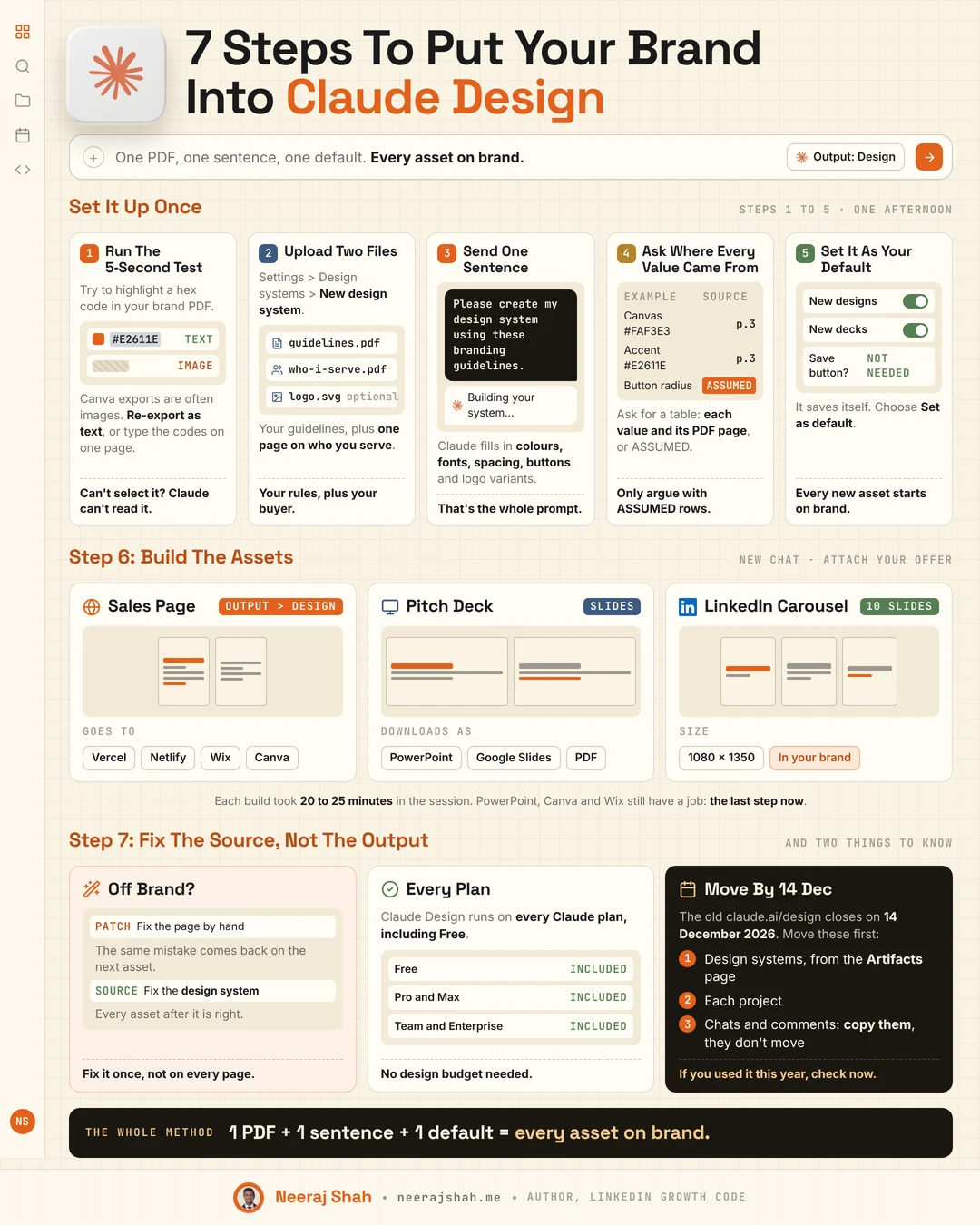
What is Claude Design, and why does it matter for LinkedIn?
Quick Answer: Claude Design is the part of Claude that builds visual work, such as pages, slides, carousels and social graphics, on a canvas beside your chat. It matters for LinkedIn because it now saves your brand as a design system. You set your colours, fonts and rules once, make it your default, and every new LinkedIn asset starts on brand.
A lot changed between May and October 2026. Claude Design used to be a separate app at claude.ai/design, with the Max plan recommended. It now lives inside any Claude chat: click Output > Design in the message box. It uses your normal Claude usage on every plan, including Free.
| In May 2026 | Now | |
|---|---|---|
| Where it lives | claude.ai/design, a separate app | Any chat (Output > Design), the Artifacts tab, or Claude Code |
| Plan | Max recommended | Every plan, including Free |
| Your brand | A brand prompt pasted into every chat | A saved design system, set as your default once |
| Decks | A project type inside Design | Claude Slides, its own starting point |
| Going live | Hand off to Claude Code | Send to Vercel, Netlify, Wix, Canva and more |
One date matters if you tried the old app. The standalone claude.ai/design closes on 14 December 2026 and then redirects to Claude. Open the Artifacts page in Claude and use Move team design systems before then.
Your first action: open a new Claude chat and look for Output > Design in the message box. On a Team plan and can't see it? Your workspace owner switches on Design and Design systems in Organization settings > Artifacts.
How do you set up Claude Design with your brand?
Quick Answer: Upload two files and send one sentence. Go to Settings > Design systems > New design system, upload your brand guidelines PDF and a one-page note on who you serve, then type "Please create my design system using these branding guidelines." Check where each value came from, fix anything Claude assumed, and set it as your default.
The setup takes five steps, in this order:
- Run the 5-second test. Open your brand guidelines PDF and try to highlight a hex code. If you can't select it, Claude can't read it either. Canva exports are often images, so re-export as text or add one page with the codes typed in.
- Upload two files. Click your name at the bottom left of Claude, then Settings, then Design systems, then + New design system. Add your brand guidelines and a one-page note on who you serve. Add your logo as a transparent PNG and SVG if you have them.
- Send one sentence. "Please create my design system using these branding guidelines." That is the whole prompt, because your files are the brief.
- Ask where every value came from. "Give me a table of every value you used and the page of my guidelines it came from, or ASSUMED."
- Set it as your default. It saves itself, with no save button and nothing to download. Open its menu and choose Set as default.
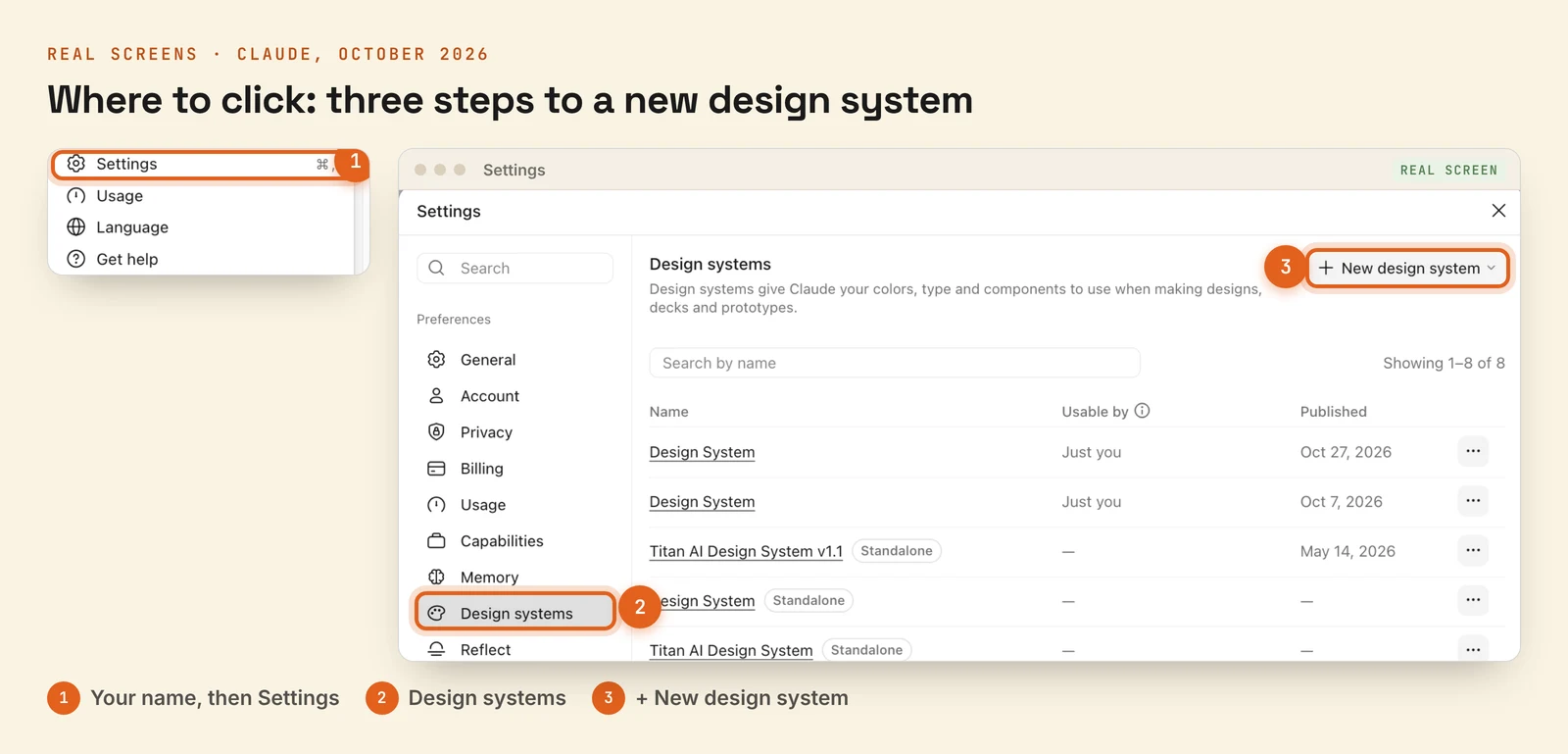
Your brand guidelines PDF needs a few things before step 2 works well: hex codes for canvas, text, accent and CTA, heading and body fonts with weights, a colour ratio such as 70/20/10, logo rules and a do-not list.
A design system that reads real examples beats one that reads only rules. Add two or three screenshots of your brand in use, such as a past carousel, your website or a deck. A palette alone gets the colours right and the layout generic. One finished page of yours beats ten hex codes.
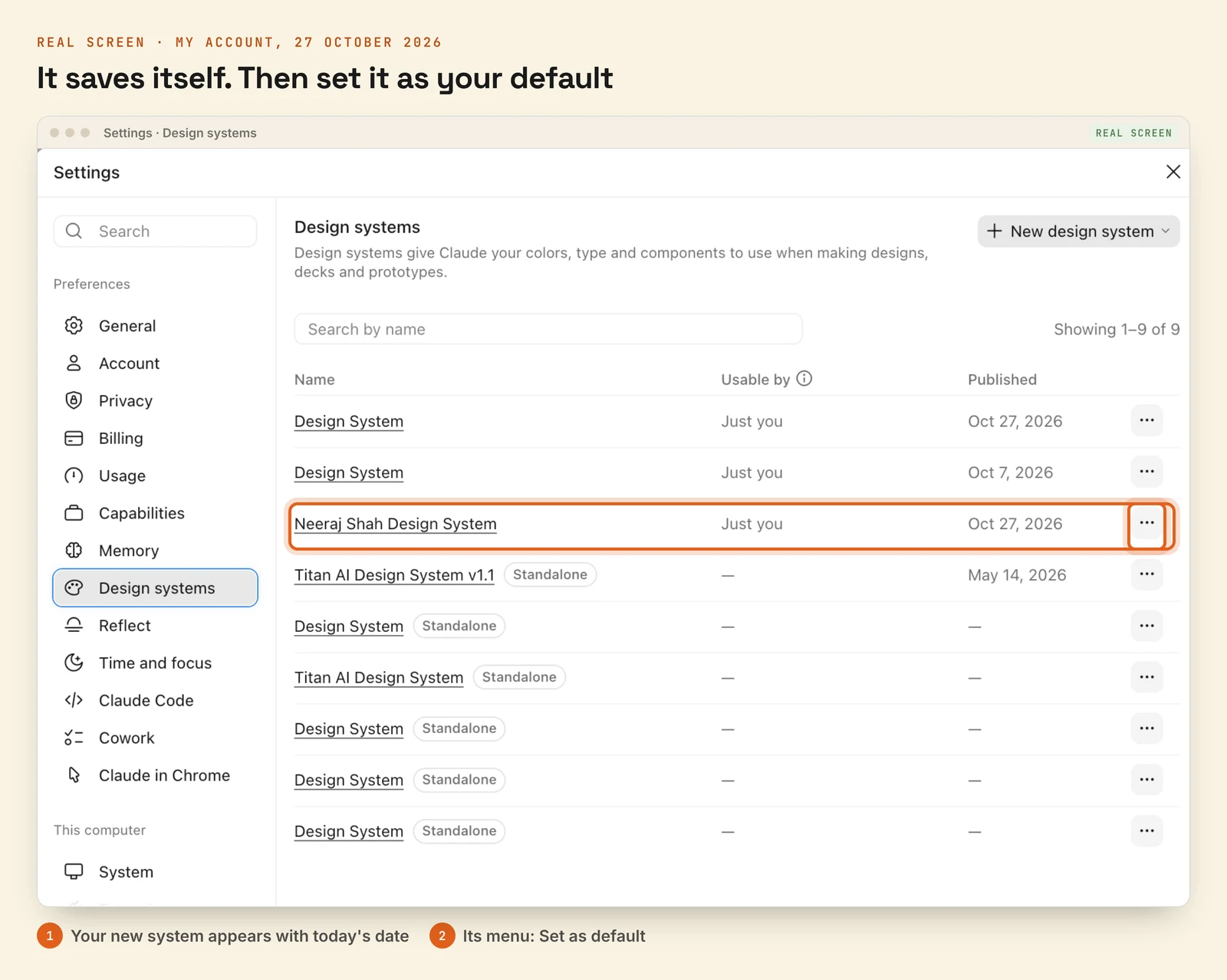
That is my own list above. The Neeraj Shah Design System, published on 27 October, sits alongside older systems marked Standalone. Those came from the old claude.ai/design, and they need moving before 14 December.
Your first action: open your brand guidelines PDF now and run the highlight test. It takes five seconds and tells you whether the rest of the setup will work.
How do you check what Claude Design guessed about your brand?
Quick Answer: Ask for the source table. Claude lists every value it used, such as colours, fonts and button styles, with the page of your guidelines each one came from. Anything it could not find is marked ASSUMED. Only argue with the ASSUMED rows, because everything with a page number came from your own file.
For my Titan brand, the table looks like this:
| Token | Value | Source |
|---|---|---|
| Canvas | #FAF3E3 Warm Sand | PDF p.4 |
| Text | #1A1A1A Carbon Ink | PDF p.4 |
| Accent | #E2611E Titan Ember | PDF p.5 |
| Heading font | Space Grotesk Bold | PDF p.7 |
| Button text | #1A1A1A on Ember | ASSUMED |
Then open the design system and check four things: the canvas hex matches the PDF exactly, the fonts are right or the substitute is named, the buttons are solid rather than hollow outlines, and the logo is your uploaded file rather than a redrawn one.
When something is wrong, tell Claude in one message: "Fix these in the design system, then show me the updated value table," followed by each wrong value, the right value and the PDF page it comes from.
Your first action: after your design system builds, ask for the source table before you make a single asset.
Which LinkedIn assets can you make with Claude Design?
Quick Answer: Every visual a LinkedIn profile and content plan needs: 10-slide carousels at 1080x1350, single image posts, quote cards, your banner at 1584x396, a newsletter header at 1200x400, event invites and client win cards. Each one is a single prompt in a new chat, with your design system selected and the content attached.
The prompt shape is always the same: "Make a [ASSET] for [WHAT] using my [BRAND NAME] design system," with the content attached. Open a new chat, click Output > Design, and check the design system menu shows your brand before you send.
| LinkedIn asset | Size | Starter prompt |
|---|---|---|
| Carousel | 1080 x 1350, 10 slides | The full prompt below |
| Image post | 1080 x 1350 | "Make a LinkedIn image post from this framework using my design system." |
| Banner | 1584 x 396 | "Make a LinkedIn banner with my headline and offer." |
| Newsletter header | 1200 x 400 | "Make a header for my newsletter [NAME]." |
| Event invite | 1080 x 1350 | "Make an invite for [EVENT], [DATE], [TIME], [LINK]." |
| Client win card | 1080 x 1350 | "Make a client win card: [RESULT] in [TIME] for [CLIENT TYPE]." |
The carousel is the one worth getting right, because it is the format people save. Start with "Design a 10-slide LinkedIn carousel, 1080x1350, using my [BRAND NAME] design system. Pull the content from the attached document." Then give it the slide plan:
- Slide 1, the cover: the headline outcome
- Slide 2: the problem, in one line
- Slides 3 to 9: one point per slide, real numbers only
- Slide 10: your headshot, name and LinkedIn handle
- One headline per slide, 15 words of body at most
- The same template on slides 2 to 9, with the cover and last slide breaking it
- Your name and handle in the footer, and the slide number top right (1/10)
Export it as a PDF and upload it to LinkedIn as a document post. For Instagram, download the .zip, or ask in chat for each slide as a PNG. When a carousel comes out right, save it as a template, so the next one is new copy in and finished carousel out.
Your first action: make your LinkedIn banner first. It is one prompt, it sits on your profile every day, and it shows you in two minutes whether your design system is right.
How do you turn one carousel into a week of LinkedIn posts?
Quick Answer: Ask for the spin-offs in the same chat. One prompt turns a finished carousel into a LinkedIn image post, a quote card and an Instagram story, all in the same design system. On a Team or Enterprise plan, Claude Motion can also turn the carousel into a short muted video for the feed.
Send this straight after the carousel: "From this carousel, make three more posts in the same design system." Then list them:
- A LinkedIn image post, 1080x1350, from slide 6
- A quote card, 1080x1350, from the strongest line
- An Instagram story, 1080x1920, from the cover, with the words clear of the top and bottom 250px
One idea becomes four assets that look like they belong together, because they come from one system.
For video, Team and Enterprise plans have Claude Motion. Ask for an animation in a normal chat and export it from Share > Export > Video as a 1080p MP4. It animates your own words and numbers with code, so there is no generated footage and no AI people. On Free, Pro or Max, use Send to Hyperframes from the export menu of any design instead.
Your first action: take the last carousel you posted, paste its text into a new Output > Design chat, and run the spin-off prompt.
What goes wrong with Claude Design, and how do you fix it?
Quick Answer: Fix the source, not the output. When an asset comes back off brand, correct the design system rather than the asset. Patch one carousel by hand and the same mistake returns on the next one. Fix the system once and every asset after it is right.
The fix is one prompt to the design system itself: "Update my [BRAND NAME] design system: buttons use a 10px radius. Add to the README: accent under 10% of any frame, on verbs, numbers and CTAs only."
These are the problems that came up most in the workshop, with the fix for each:
| What you see | Fix |
|---|---|
| Hex codes don't match your PDF | The PDF is an image. Add a text page with the codes |
| Logo redrawn or stretched | Re-upload as PNG and SVG. Add "never redraw the logo" to the README |
| Accent colour everywhere | Add to the README: accent under 10% of any frame |
| A new design ignores your brand | Check the design system menu in that chat, then Set as default |
The sales pages built in the session showed the same four content mistakes on most of them: a promise that ran too long, no hero image or video, too few icons and visuals, and clever language where plain, benefit-led language would sell better. None of these is a design system problem. They are copy problems, and each is fixable in one prompt.
Want to keep an old version before a big change? Duplicate the design system first. You can't edit its files by hand on the design system page yet, so every change goes through Claude.
Your first action: the next time an asset comes back wrong, write the fix as a design system update, not a comment on the page.
FAQ
Is Claude Design free to use for LinkedIn content? Yes. Since October 2026, Claude Design runs on every Claude plan, including Free, and uses your normal Claude usage. Claude Motion for video is the exception: it needs a Team or Enterprise plan.
What should a brand guidelines PDF include before you upload it to Claude Design? Selectable text with hex codes for canvas, text, accent and CTA, heading and body fonts with weights, a type scale and corner radius, a colour ratio such as 70/20/10, logo rules, a do-not list and three or four words that describe your voice.
Can Claude Design replace Canva for LinkedIn graphics? For creating on-brand graphics, largely yes, because it builds every asset from your saved design system. Canva still has a job: Claude Design can send finished designs to Canva, so it becomes the last step for final tweaks rather than the first.
How do I export a Claude Design carousel for LinkedIn? Export it as a PDF and upload it to LinkedIn as a document post. For Instagram, download the .zip file of slides, or ask Claude in the same chat for each slide as a PNG.
What happens to my old claude.ai/design projects? The standalone claude.ai/design closes on 14 December 2026 and then redirects to Claude. Move your design systems from the Artifacts page, move or export each project, and copy anything you need from chats and comments, because those don't move.