"How to make youtube videos with ai" gets about 34,000 YouTube searches a month, up 71% in thirty days (vidIQ keyword data, pulled 14 October 2026). Those are global estimates, so read them as a direction. Most of what those searchers find is about faceless channels and AI video generators: stock clips, a robot voice, volume over trust.
A business owner needs the opposite. A channel that wins clients, built from what you already know, presented by you, and good enough that a buyer watches twelve minutes of it.
That is what this system does. Four Claude Code agents take one long video every two weeks from topic to ready to upload, through the same Notion board as my Shorts. Two more agents are shared with the Shorts team: one checks every claim, one scores every video on Fridays. This piece walks through it step by step, with the first video made this way as the example.
The Shorts side has its own walkthrough. Start there if you have never had Claude Code edit a video, because the editing basics are explained in that piece and not repeated here.
Why should a business owner make long YouTube videos and not only Shorts?
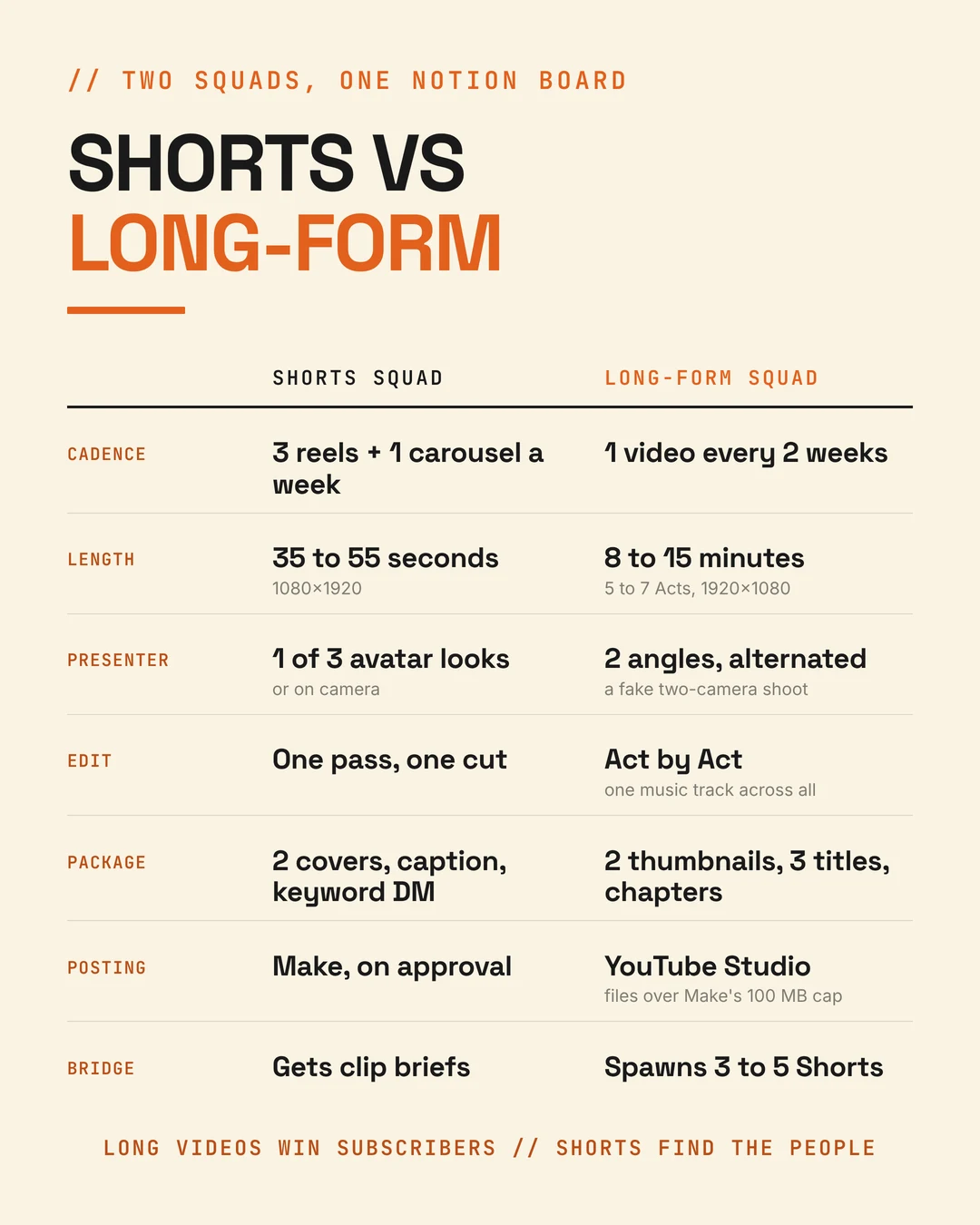
Quick Answer: Because long videos win subscribers and Shorts mostly do not. On my own channel, long videos turn a far bigger share of viewers into subscribers than even my best Short. Shorts find people. Long videos turn them into an audience that knows what you sell.
That comes from my channel's YouTube Analytics, pulled through vidIQ in October 2026. The same audit showed the price of a slow opening: most viewers who leave a long video leave in the first minute and a half. The ones still there at three minutes stayed.
It also showed the channel had no clear subject. Most of the old videos were general mentoring content from 2017 to 2020, so YouTube could not tell who to show them to. Every long video now targets one search phrase in one of two lanes: running a business on AI, and getting clients on LinkedIn with AI.
Your first action: open YouTube Studio, take your last ten uploads, and divide subscribers gained by views for each. Compare long against short before you decide where your hours go.
What does the long-form YouTube agent team do?
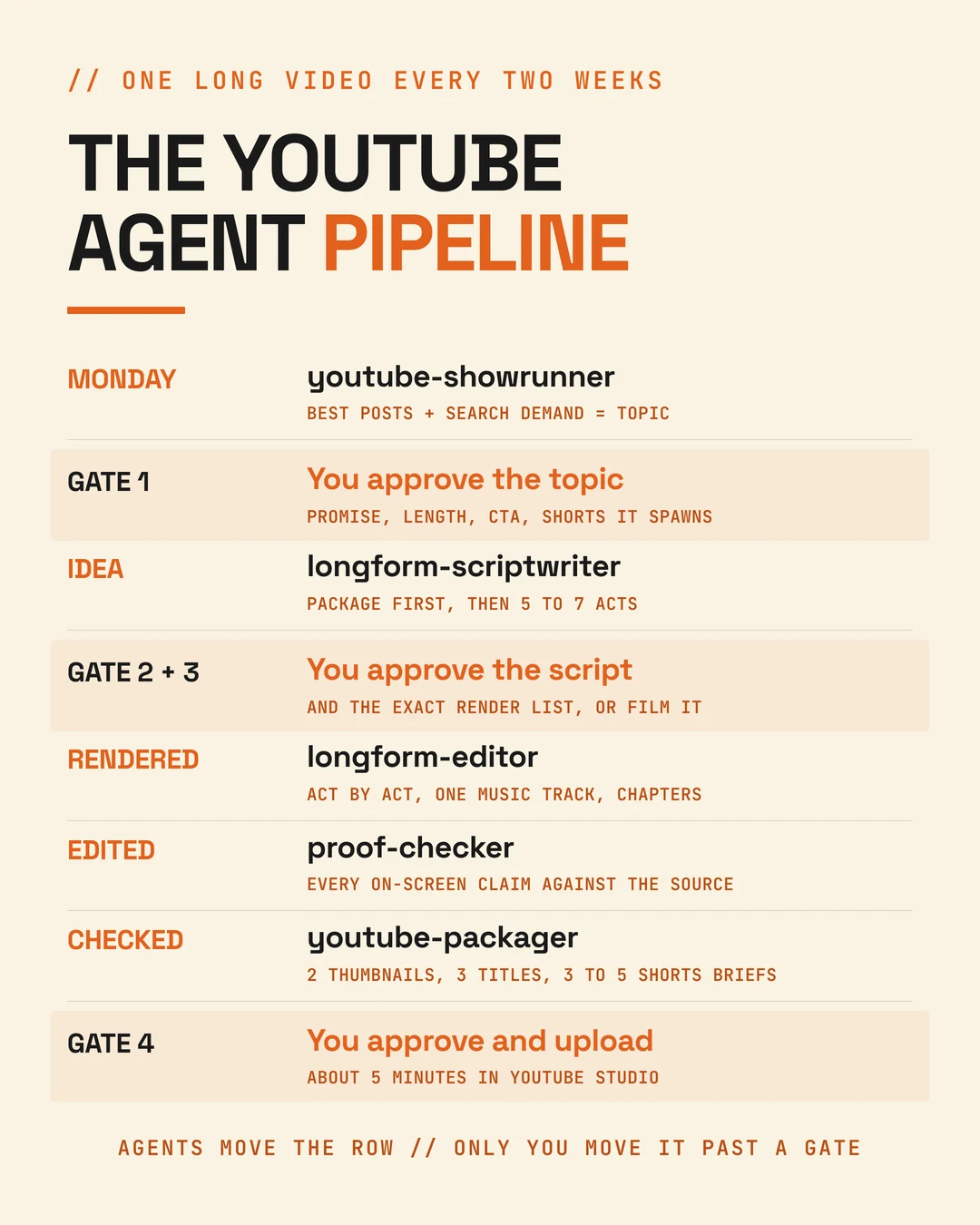
Quick Answer: Four agents, one stage each. A showrunner picks the topic, a scriptwriter writes the video in Acts, an editor cuts it Act by Act into one master, and a packager makes the thumbnails, titles, chapters and Shorts briefs. A shared proof checker blocks any unsourced claim, and I approve at four gates.
| Agent | Owns | Run with |
|---|---|---|
youtube-showrunner | The fortnight: topic, promise, length, call to action, the Shorts it spawns | /longform-plan, every other Monday |
longform-scriptwriter | Idea to rendered: script in Acts, beat plan, presenter plan, the render list | /longform-next |
longform-editor | Rendered to edited: each Act, one music track, the joined master, chapters | /longform-next, one Act per run |
youtube-packager | Checked to ready: thumbnails, titles, description, pinned comment, Shorts briefs | /longform-next |
Every long video is a row in the same Notion database as my reels, marked Format = Long-form. Status moves Idea, Scripted, Filmed / Rendered, Edited, Captions checked, Ready, Published, and each agent only touches the statuses it owns.
Your first action: add a Format column to whatever board tracks your content, so long videos and Shorts share one system instead of two.
Step 1: How do you pick a YouTube topic people actually search for?
Quick Answer: Start from what already worked with your buyers, then check it against YouTube search. My showrunner agent picks from my best LinkedIn posts, newsletters and topic bank, then matches each idea to a search phrase with real demand and low competition. I approve the topic in about five minutes.
The showrunner reads four sources: my best-performing LinkedIn posts through AuthoredUp, my newsletters, a Notion topic bank, and the Friday retro's Scale verdicts. A post that already pulled comments from buyers is a tested idea. Writing it as a video is lower risk than inventing one.
Then it checks demand. On 9 October, for example, "linkedin lead generation" showed about 52,600 YouTube searches a month at a competition score of 19 out of 100, with India the top market (vidIQ). That is a topic worth twelve minutes.
It avoids some big phrases on purpose. "Best ai tools" and "make money with ai" have huge volume, but the people searching them skew towards freelancers and job seekers, not owners of established businesses. Volume from the wrong buyer is noise.
For each video it sets the promise, the format, the length (8 to 15 minutes unless the topic needs more), the call to action, and the three to five Shorts the video will spawn.
Your first action: pick your three best LinkedIn posts of the last quarter and look up one search phrase for each in YouTube's search bar. Keep the one with the clearest match.
Step 2: How do you write a long-form YouTube script with Claude?
Quick Answer: Package first, then script. Write three title and thumbnail combinations and three cold openings before the first line, then build the script in Acts: a hook and promise, three to five segments on one spine, and a payoff. Every segment opens a loop and closes it with proof.
The scriptwriter uses the scripting-youtube-videos skill. The order matters, because on YouTube the click decides whether the script gets watched at all.
The packaging comes first. Three titles under 60 characters, three thumbnail ideas of four words or fewer, three cold openings. The script then has to deliver on the chosen combination in its first 30 seconds.
The architecture is fixed. For a 12-minute video:
- Hook and promise, about 1:15. The result or the tension in five seconds, no greeting, no channel intro. Then the problem, the exact promise, a little proof and a map of what is coming.
- Three to five segments, two to three minutes each. Each opens with a line that re-opens curiosity, teaches one idea with at least one specific, and ends on a consequence rather than a topic label.
- Payoff and close, about 1:30. Show the result, close the loop from the opening, one call to action.
It is written to be spoken. Numbers as you would say them, short sentences, contractions, a pause marker before each reveal. A timing script counts words per scene, and if a scene runs long, words get cut. The voice never speeds up.
Then the proof checker reads it. Every number, name and result has to trace to my file of approved client results, and it blocks anything that does not.
Your first action: before you write your next video, write three titles and three opening lines for it. If none of them makes you want to click, the topic is not ready.
Step 3: How do you make a long AI avatar video that does not look like one talking head?
Quick Answer: Render it in segments on two camera angles of the same avatar and cut between them, like a two-camera shoot. Key points land on the straight-to-camera angle, story and transitions on the side angle, switching at a sentence boundary every 20 to 40 seconds. Keep each Act under three minutes of voice.
"How to make ai avatar" gets about 51,600 searches a month, up 43% (vidIQ, 14 October 2026). For a long video the avatar is the easy part. Holding attention for twelve minutes is the hard part.
My rules, set on 5 October 2026:
- Two looks on one set: a podcast host in a black sweater facing the camera, and the same set at three-quarter profile. The script records which segment uses which look, so the editor can rebuild the order.
- One voice, my cloned "Neeraj Shah - Dubai Studio" voice on HeyGen's Fish engine, the same as every reel.
- Five to seven Acts, each three minutes of voice or less, which keeps every render and every edit a manageable size.
- Renders are approved as a list. Before rendering, the scriptwriter posts the exact list: Act, segment, angle, minutes of voice. My yes covers that list and nothing more. A re-render is a new list.
If I would rather film myself, the same agent writes a teleprompter script and a shot list instead, and the row waits at Ready to film.
Your first action: create a second angle of your avatar on the same background before your next long video. Two angles cost one setup and change how the whole video feels.
Step 4: How does AI edit a 12-minute YouTube video?
Quick Answer: One Act at a time. The editor cuts each Act, builds its graphics from the beat plan, and lays one music track that runs on across every Act so the joins disappear. Then it joins the Acts into a 1920x1080 master, checks it against the spec, and writes the chapters from the final cut.
The longform-editor runs the same ai-video-editor skill as the Shorts, with three differences that only matter at length.
Cuts land on the angle change. A HeyGen render has an idle moment at each segment join, a smile or clasped hands, before the look switches. The editor removes those gaps and snaps each cut to the exact frame where the angle changes, so no frames of the old angle flash on screen.
One music track across every Act. A file for each video records the track and where each Act picks it up. If an earlier Act is re-cut, every later Act is re-mixed, or the music jumps at the join.
Chapters come from the final cut. The script estimates where each chapter starts. The editor replaces those estimates with real timestamps after the master is joined.
The master has to pass the same spec check as every reel, in widescreen: 1920x1080, H.264, yuv420p, AAC, the source frame rate. Then it goes back to the proof checker, which checks that every number on screen matches the audio and the approved source.
Your first action: split your next long recording into chapters before editing anything, and edit one chapter at a time. Short pieces are easier to fix and easier to check.
Step 5: How do you package a YouTube video so people click?
Quick Answer: Copy the layout of proven thumbnails, never their content. My packager finds ten to twenty thumbnails that clearly beat their channel's normal views, copies two different layouts with my own face and promise, makes them in vidIQ's thumbnail maker, scores them, and checks each one at 160 pixels wide.
youtube-packager does five things:
- Two thumbnails, A to publish and B for YouTube's Test & compare, each modelled on a different proven layout. The rules from the first round: a specific result with a number, a clear before and after, a big face, no more than four words, and a thumbnail that says something different from the title.
- Three titles.
- A description with the chapters from the final cut and the call to action.
- The pinned comment and the end screen.
- Three to five Shorts briefs, created as Idea rows on the Shorts board with the exact timestamps to clip. They wait for Monday's slate like any other idea.
The upload is the one step it cannot finish. Make, which posts my reels, caps files at 100 MB on my plan, and most long videos are bigger. So the packager prepares everything and I upload in YouTube Studio, about five minutes.
Your first action: search your topic on YouTube, find three thumbnails getting far more views than their channel usually does, and write down what their layouts share.
What did the first long video made this way look like?
Quick Answer: "How Clients REALLY Find You on LinkedIn", published 9 October 2026: a Journey-format video following the viewer's next client from stranger to enquiry, seven Acts joined into a 12:20 master at 1080p, on a HeyGen avatar alternating two angles, with chapters taken from the final cut.
You can watch it on YouTube. It was made by hand with these skills, Act by Act, before the agents existed, and it became the model every later video copies.
Its chapters show the shape: why your next client never tells you (0:00), five steps from 2:30 to 9:33, and the payoff at 11:02.
Two decisions from it are now rules. The first title was dropped as clickbait, because it led on a single result and the video covers the whole buyer journey. And the first thumbnail, an abstract "WHICH ONE?", was replaced with a before and after modelled on a proven layout.
What is still open: the Shorts cut from it, and its numbers in the Friday retro.
Your first action: make your first long video by hand before you automate anything. The agents copy a model, so give them a good one.
Where does the human still have to step in?
Quick Answer: At four gates: approving the topic, approving the script and the exact render list, recording anything the script needs, and approving the final cut and thumbnail before I upload. Add the five-minute upload and that is the whole of my part.
The agents never spend credits without a yes, never invent proof, never publish, and never change a Notion field they did not create. Where a cloud session's subagent starts without its connectors, the main session runs that agent's steps itself, gates and proof checks included.
Your first action: list the four decisions you would never hand to an AI on a long video. Make those your gates.
FAQ
How long should a YouTube video for a business be? My default is 8 to 15 minutes, five to seven Acts, unless the topic genuinely needs more. Past 15 minutes the extra time goes into more segments, never longer ones, and the opening stays tight. Retention data decides it after that: the audit showed viewers who pass three minutes tend to stay.
Do I need to show my face on a business YouTube channel? For a business owner, yes, in some form. Buyers are deciding whether to trust you, and a faceless channel cannot help with that. An AI avatar of yourself, in your own cloned voice, saying your own ideas still counts as your face. Film yourself when the story needs real footage.
Can the same system work if I film myself instead of using an avatar? Yes. After the script is approved, the scriptwriter writes a teleprompter version and a shot list, and the row waits at Ready to film. Once the footage arrives, the editor transcribes it, removes retakes and filler, and carries on exactly as it does with a render.
How do I write YouTube chapters that are accurate? Take them from the final edit, never from the script. Script timings drift once cuts, pauses and graphics go in. My editor writes the chapter times after the Acts are joined, and the packager copies them straight into the description.
Should I label an AI avatar video on YouTube? In most cases, yes. YouTube asks creators to disclose realistic synthetic content, and a synthetically generated voice of a real person is one of its examples (YouTube's announcement). AI used only for scripts, captions or editing does not need the label.
Why not automate the upload too? Size. My automation tool's plan caps files at 100 MB and a 12-minute 1080p video is usually bigger. A higher plan would fix it, but the upload takes five minutes in YouTube Studio and it is also my last look at the video before it goes public.