People are asking whether Claude can edit video, and they are asking a lot. On YouTube, "claude video editing" draws about 768,000 searches a month, up 78% in thirty days, and "video editing using claude code" is up 260% (vidIQ keyword data, pulled 14 October 2026). Those are global YouTube estimates with India as the largest single market, so read them as a direction, not a local count.
Most of the answers out there show one edit of one clip. That is a demo. A business owner needs three Shorts and a carousel every week, made without hiring an editor and without losing the week to it.
So I built that, inside Claude Code, between 2 and 9 October 2026. Eight agents, five craft skills, one Notion board that holds the state of every reel, and four points where I approve. This piece walks through it step by step, with every tool named and one real reel from raw render to finished cut.
Long YouTube videos run on a second squad of four agents with different rules. They get their own walkthrough.
The system is two weeks old. I will tell you what it does today and where it still needs me, not what it might do.
Can Claude Code actually edit videos?
Quick Answer: Yes. Claude Code has no timeline, so it edits by writing code. It transcribes the footage, cuts it with ffmpeg, builds motion graphics as HTML with HyperFrames, adds captions and music, renders an MP4, then watches its own render and fixes what is wrong. You describe the edit. It does the clicking.
The method follows five steps: transcribe, cut, plan the beats, build, and verify in a loop.
- Transcribe. For a HeyGen render I skip speech recognition entirely and use HeyGen's subtitle file, because the text is the exact script. Nothing to mishear, nothing to pay for.
- Cut. Retakes, filler words and dead air come out. Every cut is snapped onto real silence so no word gets clipped.
- Plan the beats. A beat plan pins every graphic to a spoken word. "Three clients" on the audio, a "3 CLIENTS" card on screen at that exact moment.
- Build. HyperFrames, HeyGen's open-source framework, turns HTML and animation into video. It is Apache 2.0 licensed, renders on your own machine through headless Chrome and FFmpeg, and has no per-render fee (HyperFrames on GitHub).
- Verify. The editor pulls frames from its own render, checks them, checks the file against the delivery spec, and renders again until it passes.
The fifth step is the one that matters. An editor that hands you its first render is a tool. One that watches its own work first is closer to a team member.
Your first action: take one recording you already have and ask Claude Code to transcribe it and list every cut it would make. Read the list before letting it touch the file.
What is an AI video agent system, and how is it different from one AI video tool?
Quick Answer: A tool does one job when you ask. An agent system is a team: each agent owns one stage of a reel, picks up work when a reel reaches its stage, does it, and hands it on. The skills hold the craft, a shared board holds the state, and you approve at fixed gates.
I run it on three rules.
Agents are thin, skills hold the craft. An agent is a job description: what it owns, what it reads first, who it hands to. How to write a hook or edit a reel lives in a skill, written once and shared. When I improve the editing skill, every agent that edits gets better the same day.
Notion is the single source of truth. Every reel is one row in a Notion database called Video Studio, with a status: Idea, Scripted, Filmed / Rendered, Edited, Captions checked, Ready, Published. Each agent owns one or two statuses. Nothing important lives only in a chat window, so any session can pick up where the last one stopped.
I approve at four gates and nowhere else. The slate on Monday, each script, any recording a beat needs, and the final cut before it posts.
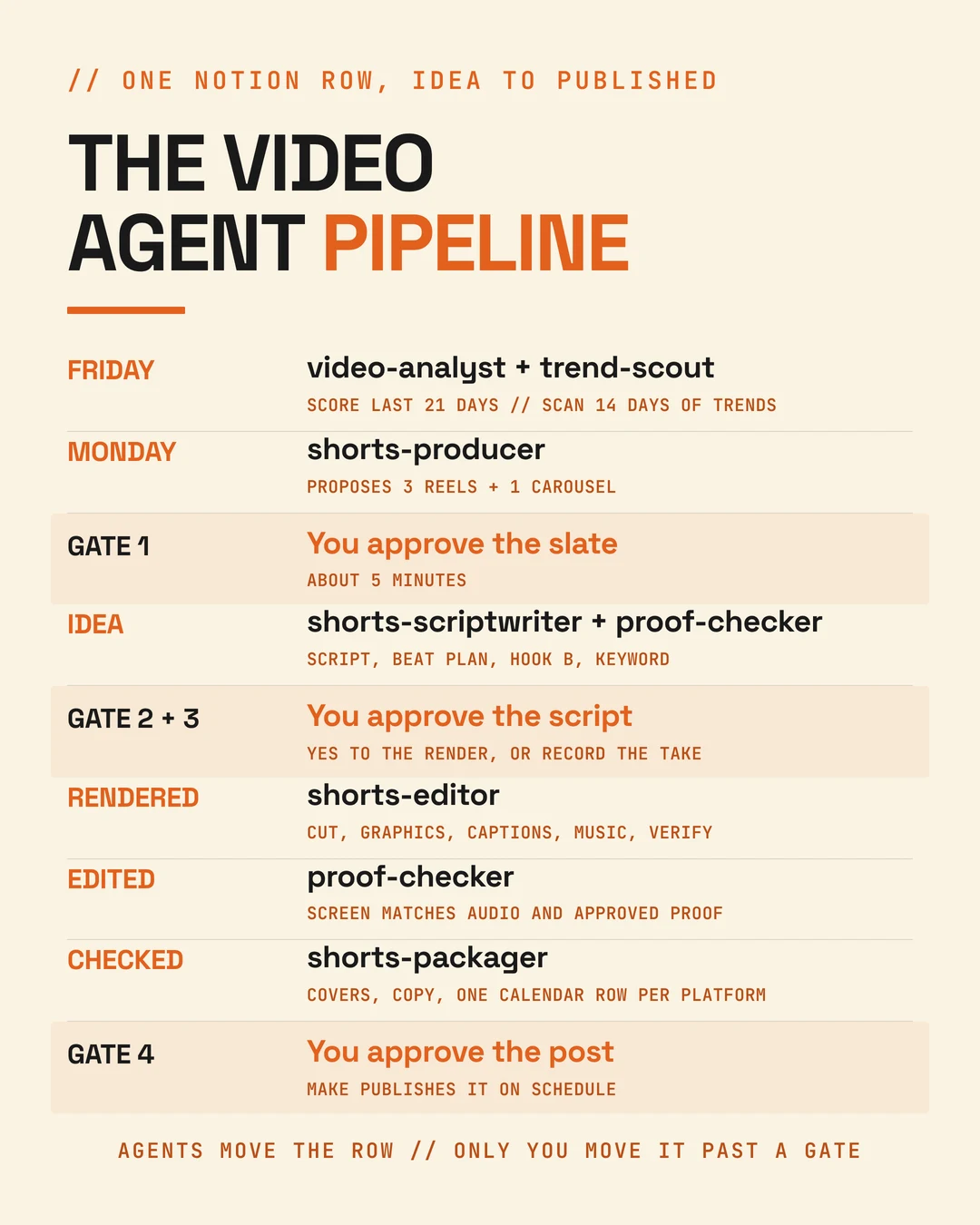
Your first action: before building any agent, list the stages one of your reels goes through and write who does each one today. That list is your org chart.
Which tools does an AI Shorts system need?
Quick Answer: Claude Code runs the agents. HeyGen makes the avatar and voice. HyperFrames and ffmpeg do the editing. Notion holds the state. Apify supplies the trend research. Make publishes. Each tool does one job, and the agents connect them.
| Tool | Its job in the system | Where it falls short |
|---|---|---|
| Claude Code | Runs all eight agents, writes scripts, edits, packages | Editing needs ffmpeg and HyperFrames installed, so it runs best on my Mac |
| HeyGen | Avatar renders in my cloned voice, plus its music library | Every render costs credits, so nothing renders without my yes |
| HyperFrames | Motion graphics, captions and cards built as HTML, rendered to MP4 | It renders what it is told; taste comes from the style file |
| ffmpeg | Cuts, audio levels, format checks | None worth naming |
| Notion | Video Studio board, Content Calendar, Keyword Registry | Connectors drop out mid-session now and then |
| Apify | The Friday scrape of trending reels, Shorts and carousels | Costs a few dollars a run, so it has a spending cap |
| Make | Posts approved rows to Instagram, YouTube and LinkedIn | Only what is approved; it never decides |
| AuthoredUp, vidIQ | LinkedIn and YouTube numbers for the Friday retro | Some Instagram numbers still come from me, copied from Insights |
| Playwright, Pexels | Screenshots of public pages, licensed B-roll | Neither is a substitute for real proof |
A handful of small Python scripts tie it together: one checks every render against the delivery spec, one ranks trending reels, one scores my own posts every Friday, one makes the covers.
Your first action: pick the one tool from this table you already pay for and find out whether it has an MCP connector for Claude. That is your first department.
Step 1: How do the agents decide which reels to make each week?
Quick Answer: From evidence, not inspiration. On Friday one agent scores every post from the last 21 days and another scrapes what is trending in my niche. On Monday a producer agent reads both, plus the backlog, and proposes three reels and one carousel. I approve the slate in about five minutes.
Three agents do this.
video-analyst runs every Friday with /video-retro. It collects plays, likes, comments, keyword comments, shares, saves and follows for every reel, Short and carousel, and gives each one a verdict against my own median: Scale (reach and job both up), Fix ending (people watched but did not act), Remake (the idea worked but the hook failed) or Kill.
trend-scout runs right after with /trend-scan. It pulls the last 14 days of Instagram reels and YouTube Shorts on LinkedIn and on AI and Claude, saves the transcripts, and ranks the hooks. The first weekly scan on 9 October pulled 1,000 items for about 4.55 US dollars. It stops and asks if a run would pass 8 dollars.
shorts-producer runs on Monday with /shorts-week and proposes the week.

The scan has already changed what I make. Across the 50 reels in the 2 October scan, reels that asked viewers to comment a keyword got 32.5 comments per 1,000 plays against 0.5 for the rest, but no more plays. Keywords buy leads, not reach. So every weekly slate now carries at least one reach reel with no keyword and a line telling people who to send it to.
Your first action: write down the plays and comments on your last ten reels and find your median. You cannot judge next week's reel without it.
Step 2: How does AI write a Short script that does not sound like AI?
Quick Answer: Give it rules from evidence and only your own material. My scriptwriter agent scores every hook against what top reels actually do, says the topic word in the first sentence, keeps reels to 35 to 55 seconds, and uses only stories and results from a file of approved client proof.
Steps 2 to 5 are three more agents and a proof checker. Here is the whole run on one page before the detail.

shorts-scriptwriter uses the heygen-shorts-builder skill and produces four things for every reel: the script, a beat plan for the editor, the presenter instructions, and the post copy.
It also writes a Hook B, a second opening of a different type, which Instagram can test as a Trial Reel. And for lead reels it picks a comment keyword and checks that the free resource behind it exists and opens without a login. A keyword whose DM is not live blocks the reel.
Then proof-checker reads the script. Every number, name and result must trace to client-results.md, my file of approved client results. On the very first pilot it blocked the script: "three hours every Sunday" had no source. The script was rewritten.
A real example of the judgement involved. For the reel "Claude edited this entire reel", the script skill turned down the avatar and asked for me on camera. Its reasoning: the hook says "I just gave it the raw footage", so the footage has to be real. An avatar would make the claim feel staged.
Your first action: start a plain text file of every client result you are allowed to quote, with the client's permission noted. No AI should write proof you have not written down.
Step 3: How do you make AI avatar reels in HeyGen that sound like you?
Quick Answer: Clone your voice once, test it against the voice engines, and lock the choice in a file every agent reads. I use one voice on one engine for everything and three looks for vertical reels, varied across the week so the grid never repeats one frame.
"How to create ai avatar in heygen" is up 152% in searches over thirty days (vidIQ, 14 October 2026), so this is where most people start.
My rules, set on 5 October 2026 and stored in one presets file:
- One voice, always. My cloned voice, "Neeraj Shah - Dubai Studio", on HeyGen's Fish engine, because to my ear it sounds most like me. If a render rejects that engine, the agent stops and tells me. It never falls back to another voice quietly.
- Three looks for reels: presenting, podcasting, and a grey blazer. The look is named in the script and on the Notion row.
- Vertical from the start, 9:16 at 1080p, so nothing gets cropped later.
- The script goes in word for word, with no captions. The editor adds captions later, styled to match my brand.
- No render without a yes in chat for that render. Renders spend credits.
Your first action: record two minutes of yourself reading a script, clone the voice, and render the same 30 seconds on every available engine. Pick by ear, then write the choice down.
Step 4: What does the AI editor actually do to a reel?
Quick Answer: It cuts, plans graphics against the words, builds motion graphics with HyperFrames, burns in captions, lays music under the voice, renders at 1080x1920, checks the file against the spec, watches its own render and fixes it. Then it makes two covers. I watch the result, not the process.
shorts-editor runs the ai-video-editor skill. The job log from a real reel made on 2 October:
- Footage: a 37.6-second HeyGen render, 1080x1920 at 25 frames a second, one continuous framing.
- Cuts: none needed beyond 0.1 seconds of silence at the start. HeyGen renders have no retakes.
- Beat plan: 10 beats, each card pinned to a spoken cue.
- Captions: 29 lines of two to three words, the active word in my brand's orange, switched off while a full-screen card is up.
- Music: two tracks from HeyGen's library offered, I picked one, faded under the voice.
- Render: 39.4 seconds, audio at -14 LUFS, verified frame by frame before I saw it.
This is that reel as it went out on YouTube Shorts on 7 October. The avatar is HeyGen. The cut, the cards, the captions and the music bed came from the editor agent; I picked the track.
Every render passes a spec check: 1080x1920, H.264, yuv420p, AAC audio, the source frame rate. A failed check means the reel cannot move to Edited. That rule exists because early exports came out at 720p.
Two lessons are now written into the skill. If a check fails twice for the same reason, change the approach instead of rendering a third time. And no frames leave the machine unless I asked: on 30 September, a frame-description feature quietly sent 28 frames to an outside AI service. It is switched off by default now.
Your first action: write your delivery spec down, size, format and loudness, and make it the last thing the editor checks before you see anything.
Step 5: How does a finished reel get packaged and posted without you?
Quick Answer: A packager agent makes the cover, writes the caption and the YouTube title, and creates one calendar row per platform with the files attached, set to Ready for Review. I watch the cut, approve the row, and Make posts it at the scheduled time.
shorts-packager takes a reel once it passes the second proof check. It makes a JPEG cover, finalises the Instagram caption and the YouTube Shorts title and description, confirms the keyword's DM works, and creates the Instagram and YouTube rows in the Content Calendar with the MP4 and the cover attached. Shorts go out at 12:30 IST unless the slate says otherwise.
Every reel gets two covers in one go. One is a cream card with a three-line headline. The other is a frame of me from the raw footage, never the edited render, with a short click line above the head.
carousel-maker does the same for the weekly carousel: two scored covers, up to ten Instagram JPEGs, a LinkedIn PDF version, and a row for each platform.
No agent can set a row to Approved. That is gate four, and it takes about a minute a post.
Your first action: set up one calendar database with a status column that only you are allowed to change to Approved. Everything an AI makes stops one step before it.
Where does the human still have to step in?
Quick Answer: At four gates, roughly five minutes for the slate, two per script, one per post, plus any recording a beat needs. And for anything the agents cannot see or hear: they have no Instagram login, and they cannot judge sound by ear. Those stay with me.
What the agents do not do, by design:
- Spend money without a yes. HeyGen renders, paid stock and scrapes over their cap all wait for me.
- Invent proof. No fake screenshots, testimonials or dashboards. AI images are for metaphors, never evidence.
- Post anything. Ready for Review is the furthest an agent can move a row.
- Change my Notion fields. They can add a field. Renaming or deleting one needs my agreement.
- Switch on a keyword DM. I test each keyword from a second account and mark it live myself.
What is still rough, two weeks in. In cloud sessions, a subagent sometimes starts without the connectors, so it cannot reach Notion or Apify; the main session then runs that agent's steps itself, gates and proof checks included. Editing runs best on my Mac, where ffmpeg and HyperFrames are installed. And the first Friday retro with a full week of data has not run yet.
Your first action: write your own list of what an AI may never do without you. Put money, proof and publishing on it first.
How do you build a Shorts agent system like this yourself?
Quick Answer: In the order I did it. Edit one reel by hand with the AI skill first, then put the stages on a board, then add agents one at a time, starting with the scriptwriter and the proof check. Add publishing and analytics last, once a reel can reach Ready for Review without manual edits.
- Make one reel by hand with the skills first. My first reel was edited on 2 October with the editing skill before any agent existed. Its job log became the model.
- Put the state on a board. One row per reel, one status per stage, a field for the script, the render ID and the final file.
- Build the gates before the agents. Decide what only you approve, and make the system unable to pass it.
- Add agents one stage at a time. Mine went producer, scriptwriter, proof check and packager first (4 October), then the editor, trend scan and analytics (9 October).
- Measure from week one. The retro is what turns a content machine into one that learns.
If you want the wider frame for where agents like these belong in a business, start with how to run your business on AI and the nine AI tools I actually use.
Your first action: build step two this week, the board, even if every row moves by hand for a month.
FAQ
Do I need to know how to code to edit video with Claude Code? No. I am not a developer. You describe the edit in plain English and Claude Code writes and runs the code. What you do need is the setup: ffmpeg and HyperFrames installed once, which Claude Code can walk you through, and a clear written style so every edit looks like yours.
Can Claude Code edit video in the cloud, or only on my computer? Both, with a catch. Editing needs ffmpeg, HyperFrames and access to a few media hosts. On your own computer that is a one-time setup. In a cloud session it works only if the session's network allows those hosts, so I plan and script in the cloud and edit on my Mac.
Is HyperFrames free to use? Yes. HyperFrames is open source under the Apache 2.0 licence, renders locally through headless Chrome and FFmpeg, and has no per-render fees or commercial-use limits, according to its GitHub page. It is separate from HeyGen's paid avatar product, which is where the credits go.
Do I have to label AI avatar Shorts on YouTube? Usually yes. YouTube asks creators to disclose realistic altered or synthetic content, and its examples include a synthetically generated voice of a real person (YouTube's announcement). Using AI for scripts, captions or editing does not need a label. When in doubt, tick the altered content box in YouTube Studio.
How much does a system like this cost to run? I will not give one monthly number, because HeyGen plans vary widely. The parts I can measure: the weekly trend scan costs about 4.55 US dollars and is capped at 8, the Friday retro asks before passing 1 dollar, and each HeyGen render costs credits I approve one by one.
Can the same agents make Instagram carousels? Yes. The carousel agent uses the same board and gates. It writes two scored covers and the slide text, builds up to ten Instagram JPEGs and a LinkedIn PDF, gets the claims checked, and creates both calendar rows at Ready for Review. No render or filming is involved.
What happens when the AI puts a wrong number on screen? The proof-checker agent reads every finished reel against the approved results file and the audio. If an on-screen number does not match the source or what was said, it blocks the row and sends it back to the same editor with the exact fix needed.