A consultant I work with sent me a screenshot in July. Ninety days of LinkedIn analytics, a line that went sideways, and one sentence underneath it: "I post more than I ever have and it does less than it ever did."
He was not being lazy. Five posts a week, every one AI-assisted, every one perfectly competent. That is the trap. Competent is the floor now, and the floor earns nothing. If your own numbers have slid while your output went up, you are not imagining it and you are not being punished for using AI.
You are being priced correctly. In May 2026 LinkedIn's VP and Executive Editor Laura Lorenzetti published Keeping conversations real on LinkedIn and named the target as "AI slop": low-effort AI-generated content that sounds polished but carries no real perspective. Her line is the one worth writing down. "It's ok to use AI to help you write, but your posts and comments need to represent your voice and your perspectives. The ultimate value comes from the human behind the tool."
This is the whole system I run, and the one I teach: profile, company page, content, lead generation, automation that stays inside the rules, outreach, the weekly rhythm that holds it together, and the numbers that tell you whether any of it worked. It is built for people selling engagements worth lakhs, not products worth hundreds.
One note before the numbers. Most of the platform research below is US and European. The mechanics hold in India, but treat the percentages as directional rather than local, and trust your own analytics over any of them.
Did LinkedIn Actually Start Penalising AI Content in 2026?
Quick Answer: No. LinkedIn did not ban or penalise AI assistance. Its May 2026 editorial position explicitly permits using AI to help you write, provided the post carries your voice and your perspective. What lost reach is content with no distinct point of view, and it lost it because readers scroll past, not because a filter caught it.
The distinction decides what you do on Monday. If AI were penalised, the fix would be to stop using it. Because undifferentiated content is what gets ignored, the fix is to change which part of the job AI touches.
This is why "write me a LinkedIn post about X" fails now and worked eighteen months ago. Everyone is prompting the same models with the same request. The output converges, and convergence is invisible.
There is a second force underneath it. The ranking system rewards attention rather than applause: how long someone stays with a post, and whether they had something to say. A comment is worth many times a like, and a post that holds a reader beats one that collects reflexive reactions. Generic writing fails both tests at once, because there is nothing in it to stay for and nothing to argue with.
Your first action: open your last ten posts and ask whether a competitor in your niche could have published any of them word for word. Every yes is a post that cost you an hour and bought you nothing.
What Should You Hand to AI, and What Must Stay Yours?
Quick Answer: Give AI the mechanical half: prospect and competitor research, transcribing voice notes, finding patterns in your own analytics, structuring an argument, repurposing one asset into several, and formatting. Keep the half that sells: your point of view, your client stories, the numbers you measured, and the first line of every message.
The mechanical work has a correct answer and carries no signature, so handing it over costs you nothing distinctive. The other half is the only part a competitor cannot reproduce by prompting the same model you used.
The highest-return use is the one almost nobody runs. Export your last quarter of post data and ask an AI model what your best performers share: format, hook type, topic, length, call to action. That is how I found the pattern two sections below. I did not notice it by reading my own feed.
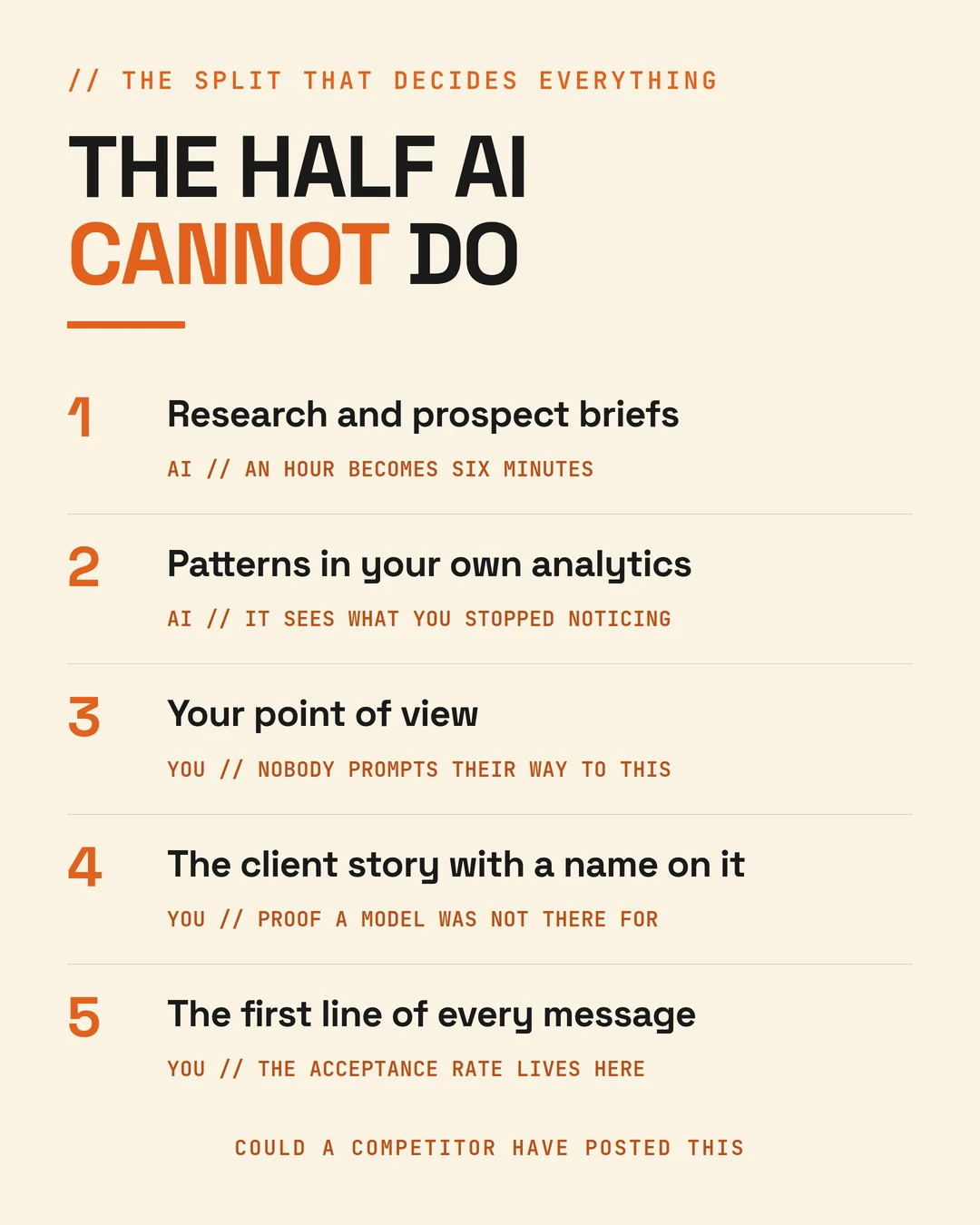
The second highest is repurposing. One client build story becomes a post, a carousel, a newsletter section, three comment-ready opinions and a lead magnet chapter. That conversion costs you no originality at all, because the thinking underneath it was yours before the model touched it.
Your first action: record thirty minutes of voice notes answering three questions. What did I fix for a client this month, and what changed in numbers? What does my industry believe that I have watched fail? Which question keeps coming up on sales calls? Transcribe it. That is your raw material for a fortnight, and it is the one input nobody can prompt their way to.
How Do You Optimise a LinkedIn Profile With AI Without Sounding Like Everyone Else?
Quick Answer: Use AI for keyword research against your buyer's actual language, for generating headline variants to test, and for structuring the About section. Write the substance yourself. Your headline and current position carry the majority of profile search weight, and your headline appears beside every comment you leave, so it works harder than any post you publish.
Your profile is not a CV. It is the landing page a buyer hits after your content earns their curiosity, and it should read as a sales page.
Start by mining your own proof rather than the internet's adjectives. Feed an assistant your last twenty client outcomes, your three most common deal types, and the exact words prospects used on discovery calls. Ask it to extract the recurring language. You are looking for the phrases your buyers use, not the ones your industry uses. Those are rarely the same, and the gap between them is where most consultants lose the search.
Then build the headline around outcome plus specificity, and prompt for fifteen variants before choosing. The test is whether a CFO would understand it in two seconds. Write the About section as a problem narrative: the problem your ideal client is losing sleep over, then your mechanism, then proof with numbers, then one clear next step. Use AI to draft the shape and rewrite the middle in your own words, because the middle is what separates a profile that converts from a profile that merely ranks.
Then load the fields most people leave empty. Skills, Featured, Services, custom URL, creator mode, and a banner that states your offer rather than your job title. Put one case study, one lead magnet and one booking link in Featured, in that order, so the ask feels earned.
Your first action: open your profile on mobile. If a stranger cannot tell who you help and what changes for them within five seconds of the fold, fix that before you write another post.
Is a LinkedIn Company Page Still Worth Optimising?
Quick Answer: Only for three narrow jobs. Metricool's 2026 benchmarks put personal profile engagement at 2.60% against 1.74% for company pages, with personal profiles reaching considerably further. For a consultancy the founder is the channel, and the page is support.
Give it exactly three jobs. First, a credibility backstop, so that when a prospect checks whether you are a real business the page answers cleanly. Complete every field and use AI to draft a keyword-rich tagline and About section from your own positioning document rather than from competitor pages.
Second, retargeting infrastructure. Install the LinkedIn Insight Tag. It costs nothing, takes twenty minutes, and it is what makes buyer intent signals and paid retargeting possible later, whether or not you use them this quarter.
Third, an amplification source. Employees are far more likely to reshare company content than third-party content, so post to the page and have your team amplify from their personal profiles where the reach actually lives. Use AI to generate distinct commentary for each person, because identical reshare text reads as coordinated and performs badly.
Two posts a week to the page is enough. Spend the saved hours on the founder profile, where the return is several times higher for the same effort.
Your first action: install the Insight Tag this week if it is not already live. Everything else on the page can wait a quarter.
How Do You Build a LinkedIn Content Strategy With AI?
Quick Answer: Build a proof bank before you build a calendar, run a pattern analysis on your own analytics to find your repeatable shapes, then write to a fixed weekly architecture where every slot has one job. AI structures and repurposes. You supply the argument, the story and the number.
A fixed architecture beats inspiration, because it removes the question of what to write. Five slots, five jobs: a contrarian point of view to earn comments, a client case study with a number to prove the mechanism, a carousel or document to hold attention, a practical framework to earn saves, and a personal lesson to build trust.
Carousels and documents consistently produce the longest attention of any native format, which is exactly what the current ranking rewards. That is the slot to protect when the week gets busy.
Batch on one morning. Ninety minutes, five posts, drafted from the proof bank and written in your own words. Then run the three-question test on each before it goes anywhere near the scheduler. Could a competitor have published this identical thing? Is there a specific number, name or date in it? Would I defend this opinion in a room? Three yeses or it is not ready.
Your first action: block ninety minutes on Monday and write all five posts for the week from your voice-note transcript. Do not open the app to look for ideas.
What Does 90 Days of My Own Data Say About What Survives?
Quick Answer: I pulled 63 published posts from a 90-day window. Thirteen earned a single save. Six of my eight most-saved posts were itemised system posts with real tool names inside them. The single biggest post by reach that quarter earned almost no saves at all.
Plenty of people read that biggest post. Nobody filed it away to use on Monday. Reach and usefulness are different metrics and only one of them fills a pipeline.
The posts that got saved had something in common that no model could have supplied: a sequence I had actually run, with the tools named and the order that mattered. The posts that got ignored were the ones a competitor could have published.
I should be careful about the mechanism here. Saves do not force reach. The same specificity that makes a post worth saving is what makes it worth reading slowly, and the ranking system rewards the reading. That is a correlation, not a lever to pull.
The practical lesson is narrower than "post more". Roughly a third of my quarter failed the three-question test, and those were the same posts nobody saved. Cutting them would have cost me nothing and bought me back several hours.
Your first action: run your last quarter through the same three questions and count the failures. That number is your real content problem, and it is not a volume problem.
How Do You Use AI to Generate High-Value Leads Rather Than Low-Quality Ones?
Quick Answer: Change the input, not the volume. Define your ideal client from your last twenty won and lost deals rather than from assumption, build lists on trigger events rather than job titles, and engage before you ever send a request. Fifty well-chosen prospects will outperform five thousand filtered ones.
LinkedIn lead generation stops being a numbers game the moment your average engagement is worth six figures in rupees. The maths that works for a low-priced product actively harms you here, because volume outreach trains your account into the ground for prospects who were never going to buy.
Layer one is definition with evidence. Feed AI your last twenty closed deals and your last twenty lost ones and ask what the winners share: company size, industry, trigger event, title, funding stage. Most consultants discover their real ideal client is narrower than they thought, and narrowing it feels uncomfortable for about a fortnight.
Layer two is signal-based list building. Stop building lists by title alone. Build by trigger: a new leadership hire, a funding round, a job advert that implies the problem you solve, a public post about the pain you fix. Sales Navigator's buyer intent aggregates signals across LinkedIn activity, ad engagement and website visits, which turns a cold list into a warm one before you say anything.
Layer three is engagement before outreach. Comment substantively on a prospect's posts for two weeks before you send a request. This single habit does more for acceptance than any tool, and AI can prepare you for it by summarising their recent activity, but the comment itself has to be yours.
Salesforce's State of Sales 2026 reports 83% of sales teams using AI saw revenue growth against 66% of teams without it. That gap is not the tools. It is whether the hours the tools freed up got spent on conversations.
Your first action: pull your last twenty won and lost deals into one document tonight and ask an AI model what the winners have in common. Write the answer down as your targeting filter for the quarter.
Is LinkedIn Automation Safe, or Will It Get Your Account Restricted?
Quick Answer: Automation that acts on the platform for you is not safe. LinkedIn's User Agreement prohibits software, scripts and bots that scrape profiles, extract data, or send automated messages and connection requests, and accounts using them risk restriction or permanent closure. Automation that runs off-platform, such as AI research, drafting and CRM logging, carries no such risk.
The working rule is one line. Automate your preparation, never your presence.
What is genuinely safe: AI used off-platform for research, drafting and analysis; native scheduling; browser tools that format and store your own content without simulating actions; CRM logging of conversations you actually had; and Sales Navigator's own AI features, which are built by LinkedIn and therefore compliant by definition.
What carries real risk: auto-connect and auto-message sequencers, profile scrapers and email extractors, auto-commenting and auto-viewing bots, and engagement pods.
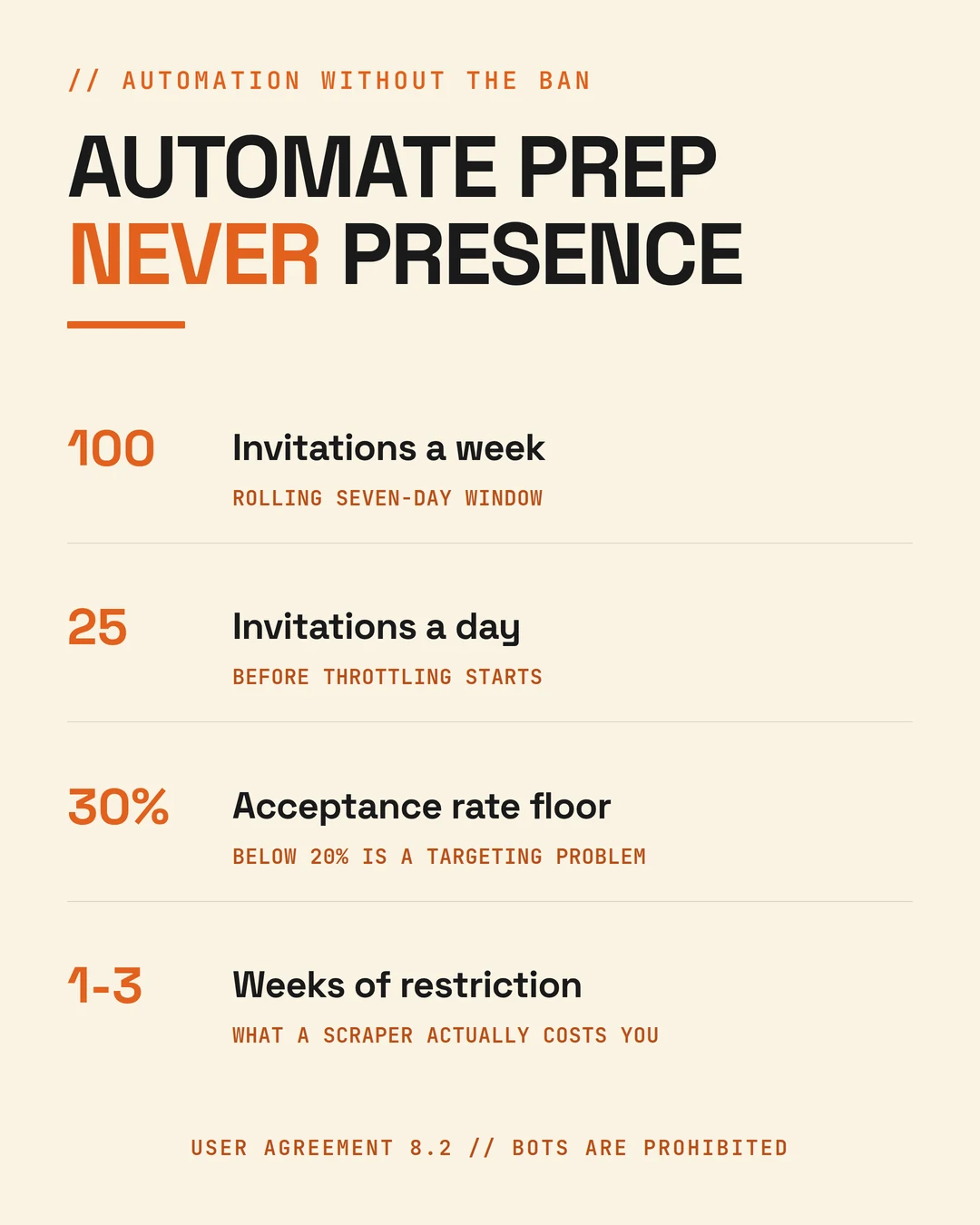
Practical ceilings matter more than tool choice. Roughly 100 connection requests a week on a rolling seven-day window, and around 20 to 25 a day before throttling starts. New accounts should assume less. Keep acceptance above 30%, because below 20% is a targeting problem rather than a volume problem.
The trade is a few saved hours against one to three weeks of feature restriction. For a consultant whose deals run through LinkedIn, that maths never works.
Your first action: if you are running an auto-connect or auto-message tool, switch to fifteen hand-written, AI-briefed requests a day this week and compare acceptance in a fortnight.
How Do You Personalise Outreach at Volume Without Sounding Robotic?
Quick Answer: Use AI to research, not to write. Ask it for three specific observations about the prospect, then write the message yourself in ninety seconds. Personalised requests that reference something specific run at roughly 35% to 55% acceptance, against 15% to 25% for generic ones, per Expandi's 2026 outreach benchmarks drawn from 13.2 million requests.
The whole gap sits in whether the first line could have been sent to anyone. A bot cannot close it, because closing it requires having read the person.
A prompt that works: give the model the prospect's recent activity, company news and role, and ask for the three business problems they are likely facing this quarter, with one specific observation you could reference for each. Then explicitly tell it not to write a sales message. You take the observations and write four lines yourself: a specific observation, why it connects to a problem you have solved, one clause of proof, and a question rather than a calendar link.
The follow-up sequence matters as much as the opener. A useful resource with no ask a few days after acceptance. A specific question about their situation a week later. A relevant case study after that. Then a clean close: "Should I stop following up?" That last message converts more often than anything before it, because it gives an honest person an easy way to be honest.
Buyers are also arriving pre-briefed. A May 2026 Gartner survey found 69% of B2B buyers now turn to sales reps specifically to validate AI-generated insights they have already gathered. They arrive half-decided and slightly suspicious of everything they have read, which is exactly the moment a generic opening line gets you deleted.
Your first action: write your next connection request in those four lines, under 400 characters, and send fifteen of them by hand this week.
What Does the Whole System Look Like in a Week?
Quick Answer: Six hours. Forty-five minutes of AI-assisted research on Monday, ninety minutes batching five posts, twenty minutes a day commenting on your buyers' posts, fifteen minutes a day on hand-written outreach, thirty minutes on pipeline on Thursday, and thirty minutes reviewing analytics on Friday.
Each block feeds the next, which is the only reason it holds. Research sharpens the content. Content warms the prospect. Engagement lifts acceptance rates. Analytics sharpen next week's research. Break one block and the others quietly lose their edge.
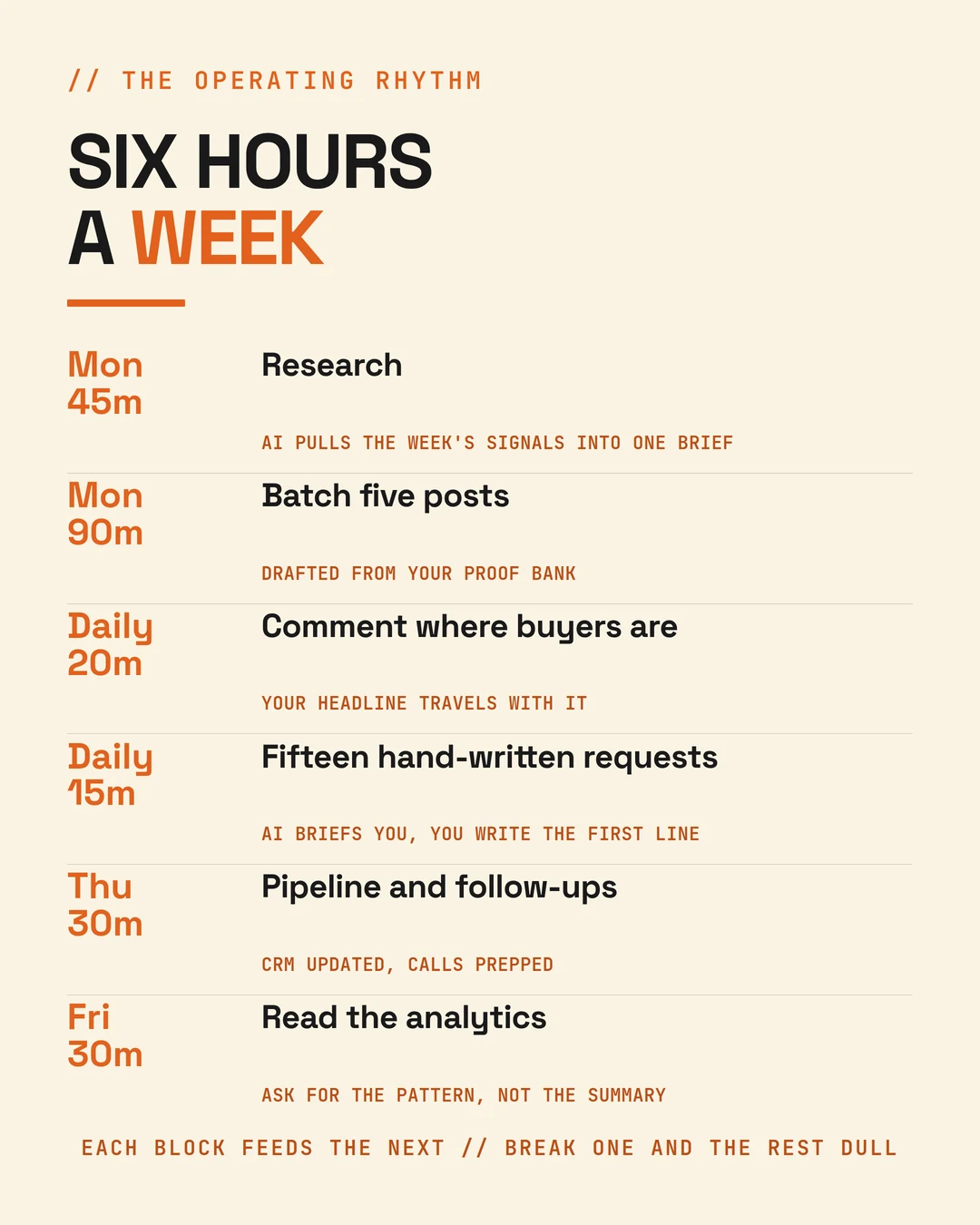
The daily commenting block is the one people skip and the one that pays. Thirty minutes a day in your buyers' comment sections will out-produce an hour posting into your own. Your comment carries your headline with it, which is why the headline is worth rewriting before anything else on your profile.
Six hours is also the honest number for someone who is delivering client work at the same time. A system that needs twenty hours a week is not a system, it is a second job, and it collapses the first month you get busy.
Your first action: block the six hours in next week's calendar before you buy another tool. If the time is not there, no stack fixes it.
Which AI Tools Are Actually Worth Paying For?
Quick Answer: One reasoning model for research and structure, one formatting and archive tool, Sales Navigator for signals, something for visuals, and a CRM you actually open. That covers roughly 90% of the need. Buy the layer, not the logo.
The stack that matters is short. A strong reasoning model does the research, the pattern analysis and the repurposing. A formatting tool previews posts and, more importantly, keeps an archive of what you published so the analytics pass has something to chew on. Sales Navigator supplies the signals and the account briefs. A visual tool handles carousels. A CRM tracks the conversations, and the discipline of opening it matters more than which one you pick.
The stack to be suspicious of is anything promising fully automated connection requests, auto-messaging, or a scraped database of LinkedIn profiles. Cheap now, expensive later, and the cost lands in the quarter you can least afford it.
Your first action: list every tool you pay for against the job it does. Anything without a job, or duplicating one, gets cancelled this week.
How Do You Measure Whether Any of This Is Working?
Quick Answer: Track eight numbers monthly: profile views, search appearances, impressions per follower, comments per post, connection acceptance rate, reply rate, calls booked, and revenue attributed to LinkedIn. The last one settles every argument the others start.
Export your analytics monthly and run a pattern analysis rather than asking for a summary. Which posts drove profile views? Which topics produced calls? Which outreach angle got replies? The output should change what you do next month, or the exercise was decoration.
One discipline pays for itself immediately: ask every prospect on the first call where they first came across you, and log it. Within a quarter you will know which of your content pillars actually generates revenue and which one you keep writing out of habit. Most consultants are surprised, and the surprise is usually expensive.
Your first action: add one question to your discovery call script this week. "Where did you first come across me?" Then log the answer somewhere you will read it.
FAQ
How does AI actually help on LinkedIn in 2026?
It compresses the mechanical work. Prospect research that took an hour takes six minutes, analytics that never got reviewed get reviewed weekly, and one client story becomes eight assets. It does not supply your point of view, which is what distribution now depends on.
Will LinkedIn reduce my reach if I use AI to write my posts?
Not for using AI itself. LinkedIn's May 2026 editorial position permits AI assistance provided the post carries your voice and perspective. Reach suffers when the content is generic, because readers do not stop for it and the ranking system reads that as a weak signal.
How many LinkedIn connection requests can I safely send per week?
Roughly 100 on a rolling seven-day window, and around 20 to 25 a day before throttling begins. New or low-activity accounts should assume less. Keep your acceptance rate above 30%, since anything below 20% points at targeting rather than volume.
Is it worth optimising a LinkedIn company page, or just the founder profile?
Put the effort into the founder profile. Metricool's 2026 benchmarks put personal profile engagement at 2.60% against 1.74% for company pages. Give the page three jobs only: credibility backstop, the Insight Tag for retargeting, and a source for employees to amplify.
Can AI write my LinkedIn outreach messages for me?
Use it to research rather than to write. Ask for three specific observations about the prospect, then write the message yourself. Personalised requests roughly double to triple the acceptance rate of generic ones, and the difference lives entirely in the first line.
What is the fastest thing to fix if my LinkedIn is not generating clients?
Your headline. It carries the majority of profile search weight and it appears beside every comment you leave, so it is doing more work than any post. Rewrite it around the outcome you deliver for a specific buyer, not your job title.
How long before a LinkedIn and AI system produces actual clients?
Expect ninety days before the pipeline reflects it, and act accordingly. Profile changes show up in search appearances within a fortnight, content patterns take a month to read reliably, and outreach acceptance moves within days. Revenue is the slowest signal and the only one that matters.
Do I need Sales Navigator to make this work?
Not to start. The profile, the content architecture and hand-written outreach work on a free account. Sales Navigator earns its cost once you are working from trigger signals rather than job titles, which is usually the point at which your targeting has already tightened.
Three ways I can help when you are ready
- Score your LinkedIn growth. Three minutes, 18 questions, and you know the one thing costing you clients: the scorecard
- 25 lead-gen prompts. What I use daily to book calls, not collect likes: get the prompts
- Titan AI Business Mastery. Build your AI operating system and take back 20+ hours a week: see the programme